
Road Surface Damage Description
Analyze road images and return structured details on potholes, cracks, and faded road markings, including severity and location.

datasciencealliance-org.describe.road-surface-damage-description:latest
Input
Image
Output
Structured JSON with road condition, overall severity, summary, plus damage information including type, severity, location and description.
Image size
640x640
Model type
QWEN3 - Better Accuracy

How It Works
Road surface damage such as potholes, cracks, and faded road markings can create safety hazards for drivers, cyclists, and pedestrians. Identifying these issues typically requires manual road inspections or reports from the public, which can make it difficult for municipalities and transportation agencies to consistently monitor large road networks and identify damage in a timely manner.
The Road Surface Damage Description ability uses road imagery, such as dash-cam or municipal survey images, to automatically identify and describe visible road surface conditions. The ability distinguishes between different types of damage, assesses their severity, and provides the approximate image location of each detected issue. It can also recognize when a visible road surface is smooth and does not show damage.
Automating this inspection process can help transportation and municipal teams review road conditions more efficiently, prioritize areas that may require maintenance, and maintain more consistent records of infrastructure conditions. Earlier identification of potholes, cracks, deteriorated road markings, and other surface damage can support preventative maintenance and reduce the likelihood that road defects develop into more significant safety hazards.
The Describe task on the Abilities tab can analyze road imagery and return a structured JSON output describing visible road surface conditions and damage.
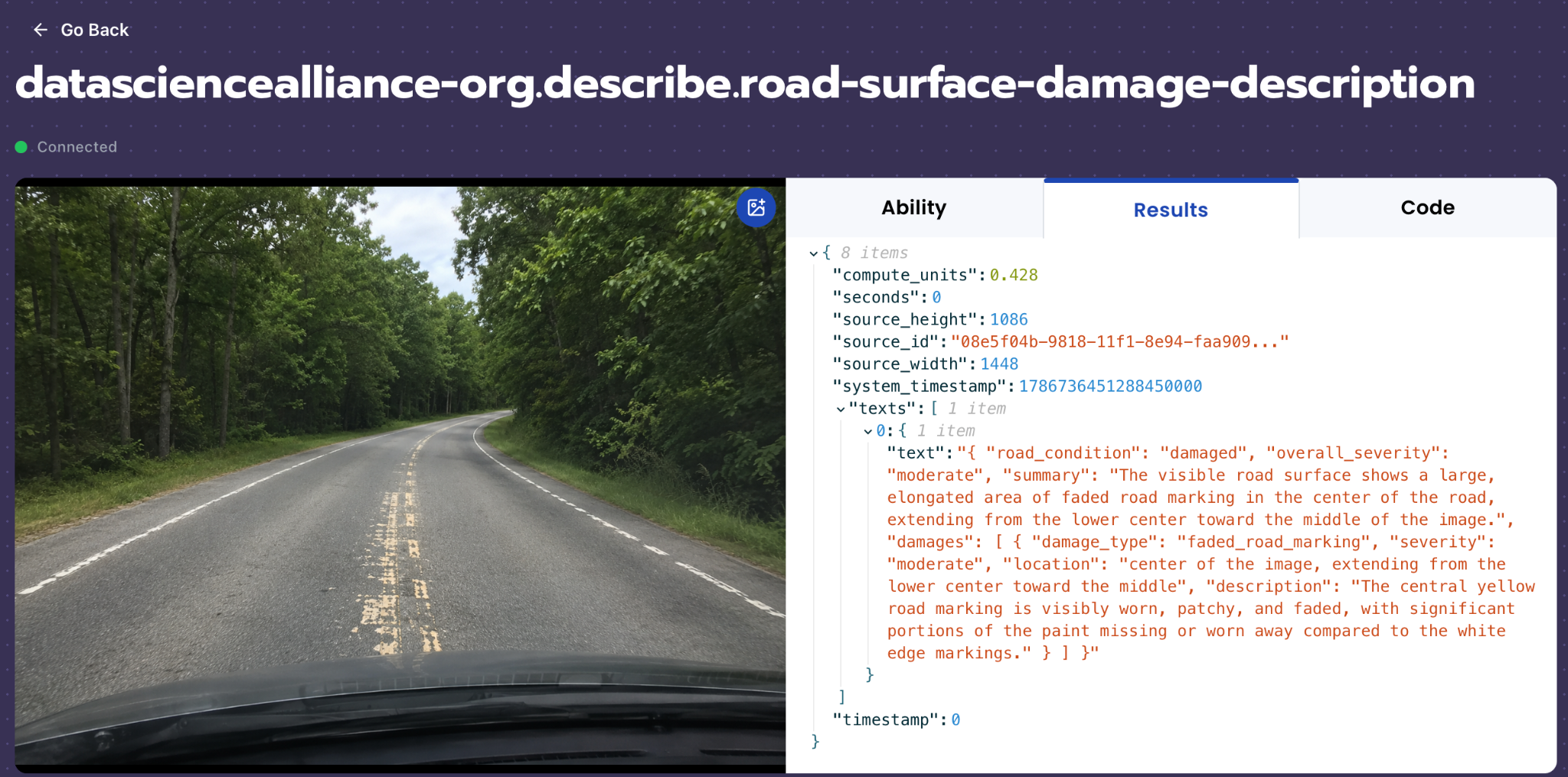
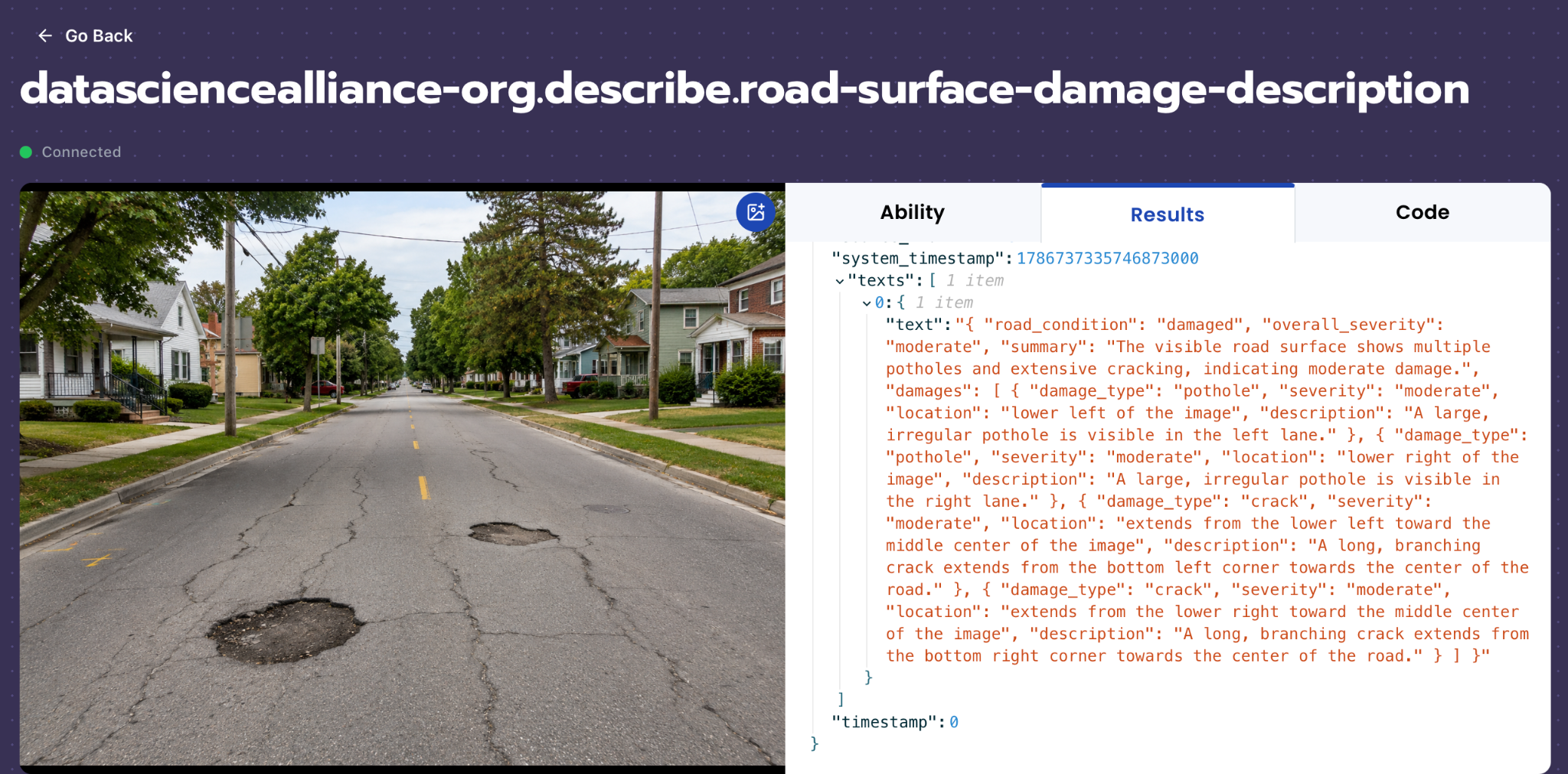
For example, an image of a road containing potholes should identify the road as damaged, describe each visible pothole, assess its severity, and provide information regarding its approximate location. An image containing cracks or faded road markings should identify these as separate damage types, describe their visible characteristics and severity, and provide their location in the image. If the visible road surface is smooth and no damage is present, the ability should identify the road as being in normal condition.
We will need to separate true road surface damage from potentially confusing visual elements such as vehicles, pedestrians, bicycles, scooters, construction equipment, shadows, reflections, dirt, and normal road texture. Wet road surfaces should not be classified as damage solely because of rain or standing water; however, visible damage such as a water-filled pothole should still be identified. The model should only report damage supported by visible evidence and should avoid inferring conditions that cannot be determined from the image.
Our expected inputs are road images captured from sources such as dash-cams or municipal road surveys, and the expected output will be a structured JSON object containing the overall road condition, overall severity, a summary of the visible condition, and individual damage entries containing damage type, severity, location, and a description. The supported damage categories include pothole, crack, faded road marking, and other road surface damage.
UI Tutorial
Step 1: Create a Describe Ability
Go to the Abilities tab and select the button Create Ability.
Fill out basic information about the ability such as its name and the description of the task itself. Since we are generating a structured report of the road condition and its damages, select the type of ability as Describe.
Name: road-surface-damage-description
Description: Given an image of a road, describe the quality of the road. If potholes and damages are found describe the severity and location. If not the road would be described as smooth and free of damage.
Step 2: Task Configuration
To configure the task, select a dataset for the specific task. If you have already uploaded your fashion product images in a dataset, simply select the name of your dataset.
However, if you haven’t already done so, select and upload your road image. Since this is a Describe ability, the output is not limited to a single classification label. Instead, the ability will generate structured JSON tags for each image.
For best results, include different combinations of damages on a road including potholes, cracks and faded road markings, different surroundings and lighting, road on a rainy day and different views of a road (dash-cam/municipal survey image).
Step 3: Describe Configuration
Our next step is to configure the prompt, select the model, and set the image size. For this use case, we recommend using the below prompt and settings for highest accuracy and best results.
Model Type: QWEN3 - Better Accuracy
Max New Tokens: 800
Scaled to: Medium - 640x640
FPS: –NA–
Prompt:
You are given an image of a road captured from a dash camera, vehicle-mounted camera, or municipal road survey camera.
Your task is to inspect the visible road surface and identify and describe all clearly visible road damage. For each damaged area, determine the damage type, visible severity, approximate location within the image, and a brief description.
Return ONLY valid JSON. Do not include explanations, markdown, or commentary outside the JSON object.
## ROAD CONDITION
Set "road_condition" to exactly one of: "smooth" — the visible road surface shows no clearly visible road damage, "damaged" — one or more clearly visible road defects are present.
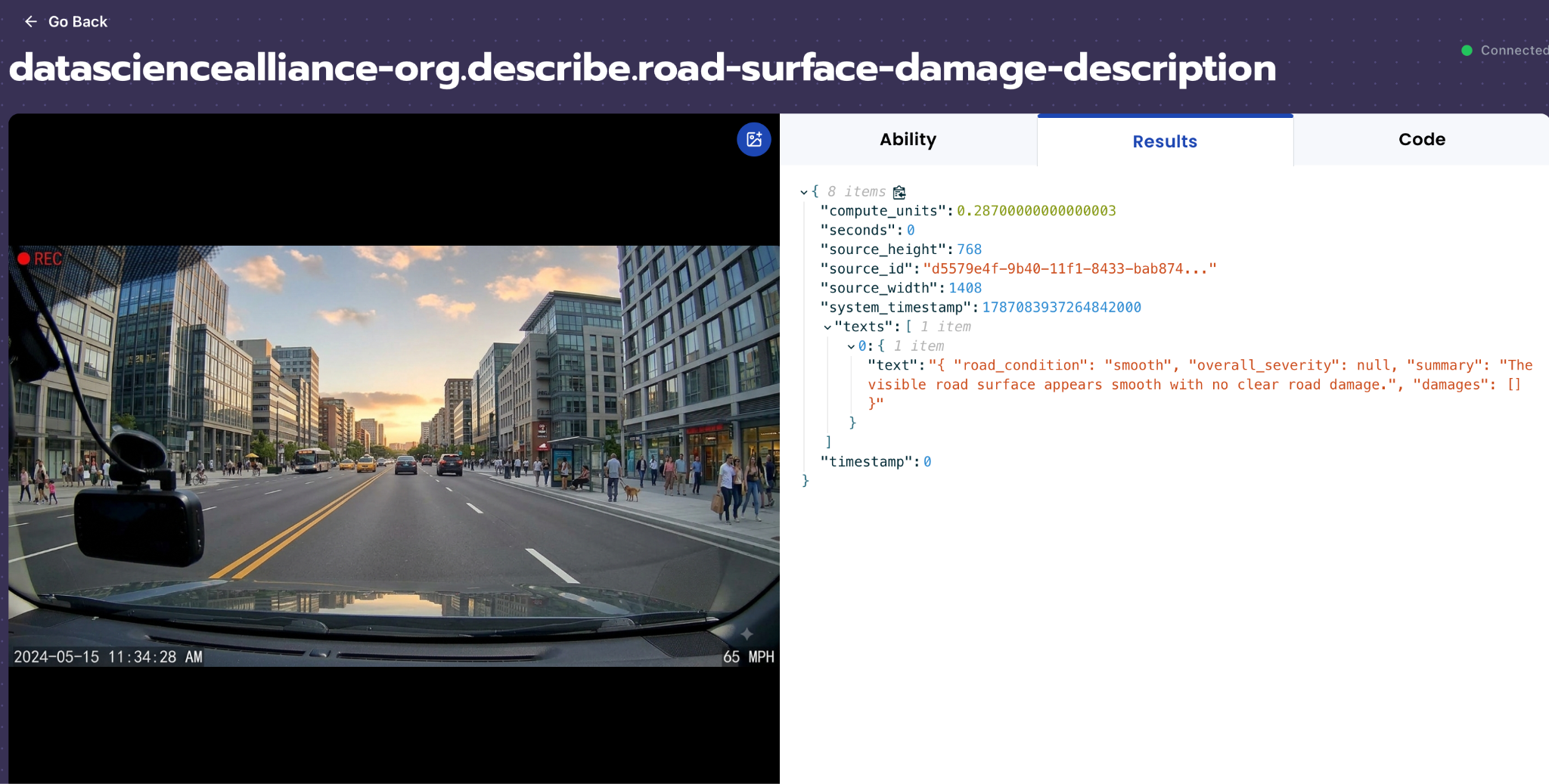
If the road is smooth, set "overall_severity" to null and return an empty "damages" array.
Base the assessment only on clearly visible evidence. Do not report possible damage that cannot be identified confidently.
## DAMAGE TYPES
For each clearly visible damaged area, set "damage_type" to exactly one of: "pothole", "crack", "faded_road_marking", "other".
### "pothole"
A localized area where the road surface is visibly broken, recessed, or sunken relative to the surrounding road. Identify a pothole based on visible evidence of physical deformation or a damaged boundary, not darkness or color difference alone. Report clearly separate potholes as separate damage entries.
### "crack"
A visible linear fracture or break in the road surface. A crack may be straight, curved, branching, or irregular. Connected or branching cracks that form one continuous damaged region should be reported as one crack entry, while clearly separate crack regions should be reported separately.
### "faded_road_marking"
A painted road marking that shows visible loss or deterioration of paint. Report a marking when portions of its paint are noticeably faint, worn away, patchy, broken, or missing compared with other visible portions of the same marking or nearby road markings. A road marking is not faded when its paint appears consistently strong and clearly visible.
### "other"
Clearly visible physical road-surface damage that does not reasonably fit "pothole", "crack", or "faded_road_marking".
## INSPECTION RULES
Inspect the entire visible road surface before producing the response. Check for all supported damage types: pothole, crack, faded_road_marking, other.
Do not stop after finding the largest or most visually prominent defect. Report all clearly visible damaged regions. Group connected damage of the same type into one entry, and report clearly separate damaged regions as separate entries.
Report only damage clearly supported by visible evidence. If a possible defect cannot be confidently identified as one of the supported damage types, omit it from "damages". Do not guess or invent damage.
## WHAT IS NOT ROAD DAMAGE
Only report visible physical deterioration of the road surface or painted road markings.
Do not classify objects or visual effects as road damage, including vehicles, people, bicycles, traffic equipment, vegetation, buildings, shadows, reflections, debris, tire marks, normal road-surface texture, or normal road-surface color variation.
## DAMAGE LOCATION
For each damaged area, provide a brief description of where the damage appears within the WHOLE IMAGE.
Describe the approximate horizontal position as "left", "center", or "right", and the approximate vertical position as "upper", "middle", or "lower". Combine them into a short location description, such as "lower left of the image", "lower center of the image", "middle right of the image", or "upper center of the image".
For elongated or widespread damage such as cracks or faded road markings, describe the main area occupied by the damage or the direction in which it extends, such as "extends from the lower left toward the middle center of the image" or "extends across the middle of the image".
Always determine location relative to the WHOLE IMAGE, not relative to the road centerline, lanes, road edges, direction of travel, or vehicle position. Do not provide GPS coordinates, street names, addresses, or physical distances.
## SEVERITY
Set "severity" to exactly one of: "minor" — small or limited visible damage that is clearly present but limited in size or extent, "moderate" — clearly visible damage affecting a noticeable portion of the road surface that is significant but does not appear severe enough to be likely to cause an accident for vehicles traveling on the road, "severe" — substantial, extensive, or widespread visible damage that appears serious enough to create a significant driving hazard or contribute to an accident.
Determine severity only from what is visually apparent in the image, considering the visible size, extent, and condition of the damaged area. Do not estimate exact dimensions, structural integrity, repair costs, or required repairs.
## OVERALL SEVERITY
Determine "overall_severity" from both the severity of individual damaged areas and the amount and extent of damage across the visible road.
Only a small amount of minor damage → "minor", at least one moderate damaged area → normally at least "moderate", at least one severe damaged area → "severe", several minor damaged areas affecting a noticeable portion of the road → may be "moderate", several moderate damaged areas affecting a substantial portion of the road → may be "severe", no visible damage → null.
Do not determine "overall_severity" only from the single largest defect. Consider the combined visible condition of the road.
## DAMAGE DESCRIPTION
For each damaged area, provide a short factual description of its visible characteristics. Keep the description concise and describe only what can actually be seen.
Examples: "A localized depression is visible in the road surface.", "A branching crack extends across the road surface.", "The painted road marking is visibly worn and faded."
Do not speculate about the cause of the damage, recommend repairs, estimate measurements, or estimate repair costs.
## SUMMARY
Provide a brief overall description of the visible road condition in "summary". If damage is present, summarize all distinct damage types reported in "damages". If the road is smooth, state that the visible road surface appears smooth with no clear road damage. Do not describe unrelated objects or surroundings.
## REQUIRED JSON STRUCTURE
Return this exact JSON structure:
{
"road_condition": null,
"overall_severity": null,
"summary": null,
"damages": [
{
"damage_type": null,
"severity": null,
"location": null,
"description": null
}
]
}
Use only the allowed values defined above. Return only the JSON object.
We chose Max New Tokens to be 800 because the model needs enough space to return a structured JSON object with different damages and their information. In addition, we use an image size of 640x640 to preserve enough detail to find potholes, cracks and faded markings if they are present in the image.Since this is an image description task rather than a video event detection task, FPS is not applicable.
Step 4: Test the Describe Ability
After creating the Describe ability, test it on several road images captured from dash cameras, vehicle-mounted cameras, or municipal road survey cameras. The expected output should be a structured JSON object that summarizes the overall road condition, overall severity, visible damage types, approximate locations within the image, and brief descriptions of each damaged area.
For example, if the image shows two separate potholes and a minor crack, the output should identify the road condition as damaged, report each pothole as a separate "pothole" entry, report the crack as a "crack" entry, assign an appropriate severity to each damaged area, and describe each damage location relative to the whole image, such as "lower center of the image" or "middle right of the image". The summary should briefly describe the overall visible condition of the road.
If the image shows moderate cracking and worn lane markings, the output should identify the road condition as damaged, report the visible crack regions as "crack" and the deteriorated markings as "faded_road_marking", assign their visible severity, and describe where each occurs within the image. Connected cracks should be grouped into a single damaged region, while clearly separate crack regions should be reported separately.
If the image shows a smooth road with no clearly visible potholes, cracks, faded road markings, or other road-surface damage, the output should identify the road condition as "smooth", set overall severity to null, and return an empty "damages"array.
Step 5: Review the Output
After testing the ability, review the JSON output to make sure the model is identifying and describing road surface damage accurately and consistently.
Check whether:
- The overall road condition is correctly identified as "smooth" or "damaged".
- Potholes, cracks, faded road markings, and other road-surface damage are classified correctly.
- Clearly separate damaged areas are reported as separate entries when appropriate.
- Connected or branching cracks are grouped into continuous damaged regions rather than reported as many individual cracks.
- The severity of each damaged area reasonably reflects its visible size, extent, and condition.
- The location description accurately describes where the damage appears relative to the whole image.
- Shadows, vehicles, road texture, debris, and other non-damage features are not incorrectly reported as road damage.
- Damage that is not clearly visible is omitted rather than guessed.
- The summary accurately reflects the damage reported in the individual entries.
- The output is valid JSON with no extra commentary.
If the output misses clearly visible damage, adjust the prompt to emphasize inspection of the entire visible road surface and all supported damage types. If the model produces false positives, strengthen the instruction to report only damage that is clearly supported by visible evidence.
Tips for Accuracy
1. Report Only Clearly Visible Damage
Telling the model when not to report a possible defect is just as important as defining the supported damage types. Road images may contain shadows, surface texture, debris, or other visual features that resemble damage.
In our prompt, the model is instructed to report only damage that is clearly supported by visible evidence. If a possible defect cannot be confidently identified as pothole, crack, faded road marking, or other road-surface damage, it should be omitted rather than guessed.
2. Define Edge Cases
High accuracy depends on clearly distinguishing actual road deterioration from objects and visual effects that may resemble damage.
Examples of edge cases include:
- A streetlight, tree, or vehicle shadow being mistaken for a pothole or crack.
- Normal variations in asphalt color or texture being mistaken for damage.
- Tire marks being mistaken for cracks.
- Debris or leaves on the road being mistaken for surface deterioration.
- A road marking appearing faint because of a shadow or obstruction rather than actual paint deterioration.
- Several connected cracks being reported as many separate defects instead of one continuous cracked region.
- A dark patch being mistaken for a pothole even though there is no visible physical depression or damaged boundary.
3. Use Diverse Road Images
To evaluate performance effectively, the dataset should include a range of road conditions, damage types, and image perspectives. This includes dash-camera images, vehicle-mounted survey images, and municipal road survey imagery.
The dataset should contain smooth roads as well as roads with potholes, minor and moderate cracks, faded road markings, and combinations of multiple damage types. Images should also vary in road layout, surrounding environment, viewing distance, and lighting while remaining clear enough for the road surface to be assessed.
4. Separate Road Damage from the Surrounding Scene
The ability should describe the road surface and its visible condition, not unrelated objects in the scene. Vehicles, pedestrians, bicycles, buildings, vegetation, traffic equipment, shadows, and other surroundings should not influence the road-condition classification unless they obstruct the ability to see the road.
The most useful information for this ability is the damage type, visible severity, approximate location within the image, and a concise description of the damaged area.
5. Keep the JSON Schema Consistent
For downstream infrastructure and municipal workflows, consistency is important. The model should always return the same JSON structure containing road_condition, overall_severity, summary, and damages.
Each reported damaged area should consistently contain damage_type, severity, location, and description. A consistent structure makes the results easier to parse, store, compare, and integrate into road inspection workflows.
6. Avoid Overinterpreting Road Conditions
The model should assess only what is visually observable in the image. It should not infer the cause of damage, estimate exact dimensions, determine structural integrity, recommend repairs, or estimate repair costs.
For example, a visible depression with a damaged boundary can be reported as a pothole, but the model should not guess its depth or how it was formed. Similarly, a visible crack can be described and assigned a severity based on its visible extent, but the model should not infer damage beneath the road surface.
Get early access
Want to move faster with visual automation? Request early access to Abilities and get notified as new vision capabilities roll out.