
Livestock Headcount and Health Flagging
Counts livestock and flags visibly injured, lame, or isolated animals in video footage.

datasciencealliance-org.describe.livestock-headcount-healthflagging:latest
Prompt
{
"total_headcount": null,
"species_count": null,
"flagged_animals": [
{
"species": null,
"animal_reference": null,
"flags": null,
"description": null
}
]
}
If no animals are flagged, return an empty "flagged_animals" array.
...Run the full prompt in your EyePop.ai dashboard
Input
Video
Output
Structured JSON with count of livestock and flagged animals that are injured, lame or isolated and their description
Image size
640x640
Model type
QWEN3 - Better Accuracy
FPS
5

How It Works
Monitoring livestock populations and identifying animals that may require attention can be challenging, particularly in large pens, pastures, and farm environments. Livestock headcounts and visual health checks often require manual observation, making it difficult for farmers and agricultural teams to consistently monitor groups of animals and quickly identify potentially concerning conditions.
The Livestock Headcount and Health Flagging ability uses livestock video footage, such as farm monitoring or pasture videos, to automatically count visible animals and flag individuals showing visually observable signs of injury or isolation. The ability identifies livestock species, provides a headcount by species, and describes flagged animals using visible characteristics and their relative location. It can also flag signs of lameness when they are visually apparent, although reliable lameness assessment may require observing an animal’s movement over time.
Automating this monitoring process can help agricultural teams review livestock more efficiently, maintain more consistent headcount records, and identify animals that may require closer inspection. Earlier detection of visible injuries, isolation, or other concerning observations can help farmers prioritize animals for further assessment and support more efficient livestock management.
The Describe task on the Abilities tab can analyze livestock video footage and return structured JSON output describing the visible livestock and any individuals that may require attention.
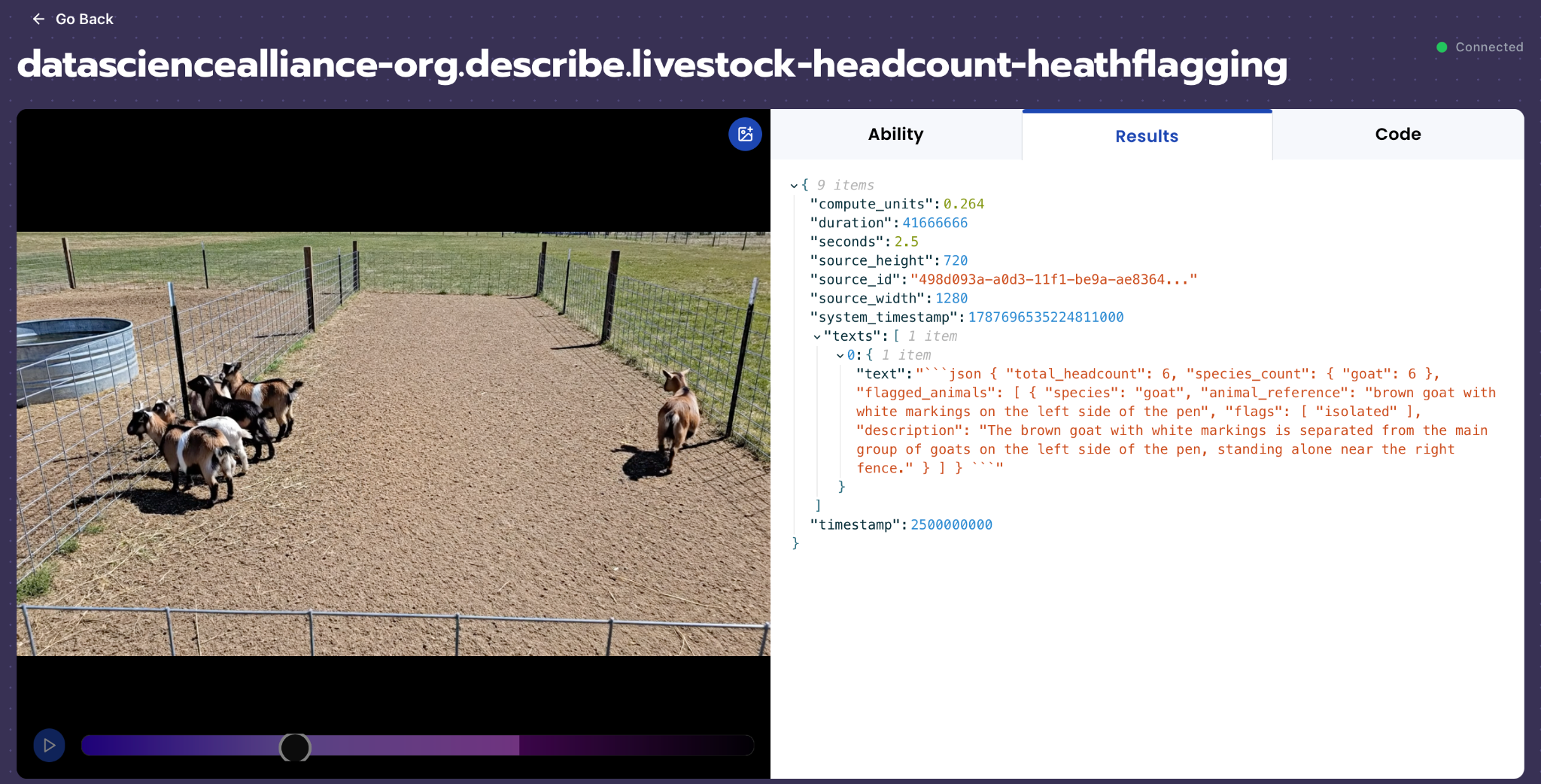
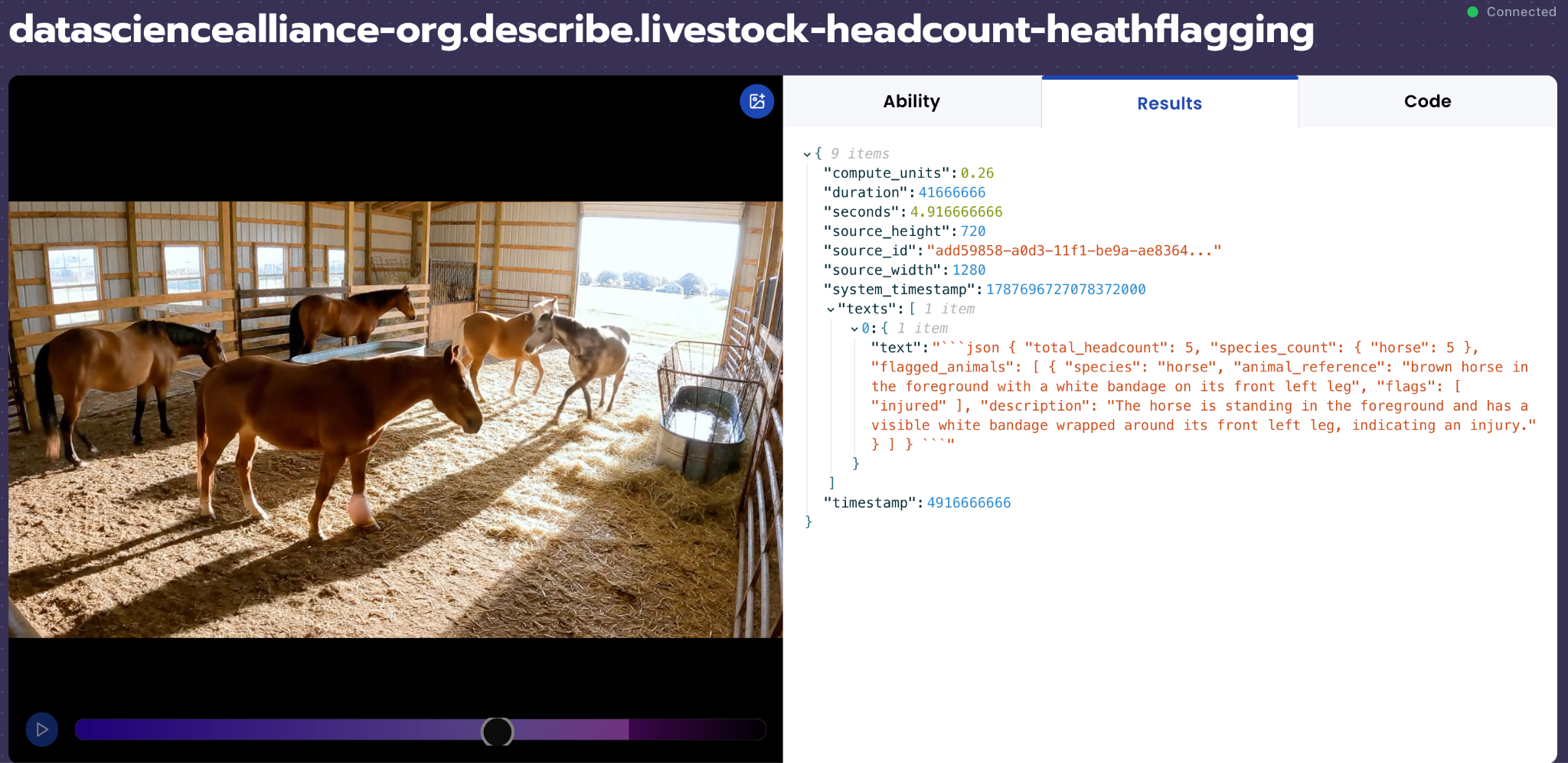
For example, a frame containing cattle and sheep should identify the visible livestock species and provide a headcount for each species and an overall headcount. If an animal has a clearly visible injury, the ability should flag that individual as injured, describe the visible evidence, and provide an animal reference that helps distinguish it from the rest of the group. An animal that is clearly separated from the main group can similarly be flagged as isolated. When visually supported, an animal showing signs associated with lameness can be flagged as lame.
The ability should distinguish genuine health flags from normal livestock appearance, posture, and behavior. Animals should not be flagged simply because they are standing, resting, lying down, positioned differently from other animals, or temporarily separated from the group. The model should only report conditions supported by visible evidence and should avoid diagnosing diseases or inferring injuries or health conditions that cannot be determined visually.
Our expected inputs are livestock videos captured in environments such as pens, pastures, barns, stables, and poultry enclosures. The Video/Describe ability samples the video at the configured FPS and produces an output for each sampled frame. The expected output for each frame is a structured JSON object containing the total headcount, species count, and flagged animals. Each flagged-animal entry includes the animal's species, a visual reference identifying the individual, applicable flags, and a brief description. The supported flags include injured, isolated, and lame.
UI Tutorial
Step 1: Create a Describe Ability
Go to the Abilities tab and select the button Create Ability.
Fill out basic information about the ability such as its name and the description of the task itself. Since we are reporting the headcount of livestock and their health condition using a structured JSON for each frame, select Describe Video as the type of ability.
Name: livestock-headcount-healthflagging
Description: Counts livestock and flags visibly injured, lame, or isolated animals in video footage.
Step 2: Task Configuration
To configure the task, select a dataset for the specific task. If you have already uploaded your livestock videos in a dataset, simply select the name of your dataset.
However, if you haven’t already done so, select and upload your livestock videos. Since this is a Describe Video ability, the output is not limited to a single classification label. Instead, the ability will generate structured JSON output for each sampled video frame.
For best results, include videos containing different livestock species such as cattle, sheep, goats, horses, pigs, and chickens. Include healthy groups as well as different combinations of visibly injured and isolated animals, and examples of lameness when the condition is clearly observable. The dataset should also include mixed-species groups, different animal counts, varied farm environments such as pens, pastures, barns, stables, and poultry enclosures, and different animal positions and group arrangements.
Step 3: Describe Configuration
Our next step is to configure the prompt, select the model, and set the video size and FPS. For this use case, we recommend using the below prompt and settings for highest accuracy and best results.
Model Type: QWEN3 - Better Accuracy
Max New Tokens: 600
Scaled to: Medium - 640x640
FPS: 5
Prompt:
Analyze the entire video and identify all visible livestock. Count distinct animals across the video and flag individuals that are visibly injured, lame, or isolated.
Count each animal only once, even if it appears across multiple frames. Identify the livestock species and report the number of each species. "species_count" is a dictionary where each livestock species is a key and its corresponding number of visible animals is the value.
Health flags:
"injured": The animal has a clearly visible physical injury, such as a wound, bleeding, swelling, bandage, deformity, or visibly injured limb. Only report injuries that are visually observable. Do not infer internal injuries or disease.
"lame": The animal shows a clearly abnormal gait while moving, such as repeated limping, uneven walking, or consistently avoiding weight on a limb. Determine lameness from movement across multiple frames, not from a single frame or static posture. Only report lameness when the abnormal movement is clearly visible.
"isolated": The animal is clearly separated from the main group in the current frame, with a noticeable area of empty space between it and the other animals. Flag isolation only when one animal is visibly apart from a clearly grouped majority. Do not require evidence that the separation persists across the video.
For each flagged animal, provide an "animal_reference" that helps a reviewer distinguish that individual from the other animals using visible characteristics such as species, coat color or markings, and relative location. For example: "brown goat with white markings on the left side of the pen", "black cow separated from the group on the far right", or "white sheep near the fence". Do not assign arbitrary identifiers such as "goat 1" or invent characteristics that are not visible.
An animal may have more than one flag. If the same animal is both injured and lame, for example, include both flags in the same entry.
Only report a health flag when there is clear visual evidence. If a condition cannot be determined confidently from the video, do not flag it. Do not diagnose diseases or infer the cause of an injury or abnormal behavior.
Return only valid JSON in exactly this structure:
{
"total_headcount": null,
"species_count": null,
"flagged_animals": [
{
"species": null,
"animal_reference": null,
"flags": null,
"description": null
}
]
}
If no animals are flagged, return an empty "flagged_animals" array.
We chose Max New Tokens to be 600 because the model needs enough space to return a structured JSON object containing the livestock headcount and information about any flagged animals. In addition, we use an image size of 640×640 to preserve enough visual detail to identify livestock species, count visible animals, and recognize visible injuries or isolation. Since this is a Describe Video task, we use an FPS of 5, so the model can detect the flags with enough samples per second.
Step 4: Test the Describe Ability
After creating the Describe ability, test it on several livestock videos containing different species, animal counts, group arrangements, and visible health conditions. The expected output for each sampled frame should be a structured JSON object containing the total livestock headcount, count by species, and information about any flagged animals.
For example, if a frame shows four cattle and two sheep and all animals appear healthy, the output should report a "total_headcount" of 6, provide the corresponding counts for cattle and sheep in "species_count", and return an empty "flagged_animals" array.
If a frame shows a group of goats with one clearly separated from the main group, the output should flag that individual as "isolated". The "animal_reference" should help distinguish the flagged goat using visible characteristics such as its coat color, markings, or relative location, and the description should briefly explain the visible evidence for the flag.
If a frame shows an animal with a clearly visible injury, the output should flag that individual as "injured" and describe the visible injury. If multiple animals have different visible conditions, each animal should be reported separately. An individual animal may also receive more than one applicable health flag when supported by visible evidence.
Because Describe Video analyzes sampled frames independently, health flags should reflect what is visually observable in each analyzed frame. Conditions that cannot be determined reliably from the current frame should not be guessed.
Step 5: Review the Output
After testing the ability, review the JSON output to make sure the model is counting livestock and flagging visible conditions accurately and consistently.
Check whether:
- The "total_headcount" correctly represents the number of visible livestock in the sampled frame.
- The "species_count" correctly identifies each visible livestock species and its corresponding count.
- Injured animals are correctly flagged as "injured" only when there is clear visual evidence.
- Animals clearly separated from the main group are appropriately flagged as "isolated".
- "lame" is only reported when there is sufficient visible evidence and is not guessed from normal posture or movement.
- Each flagged animal is reported separately.
- An animal with multiple applicable conditions receives all appropriate flags.
- The "animal_reference" provides enough visible information to distinguish the flagged animal from others in the frame.
- Healthy animals are not incorrectly flagged because of normal posture, resting, positioning, or appearance.
- Conditions that are not clearly observable are omitted rather than guessed.
- The description accurately explains the visual evidence supporting each flag.
- The output is valid JSON with no extra commentary.
If the output misses clearly visible injuries or isolated animals, adjust the prompt to clarify the visual criteria for those flags. If the model produces false positives, strengthen the instruction to report only conditions supported by clear visual evidence. Keep in mind that Video/Describe analyzes sampled frames independently, so conditions that depend on movement over time, particularly lameness, may not be reliably determined from an individual frame.
Frame-Level Variability
Because the Describe Video ability analyzes individual sampled frames independently, results may vary across frames from the same video. For example, the model may correctly count seven animals in one frame but overcount in another due to overlapping animals, partial visibility, or visually confusing features such as horns and limbs. Similarly, an injured or isolated animal may be correctly flagged in some frames but missed in others as the animal’s position, visibility, or surrounding group arrangement changes.
Therefore, performance should not be evaluated based on a single frame alone. When the expected headcount or health condition is correctly identified in multiple frames of the video, this demonstrates that the ability can recognize the target condition, even if the result is not consistent across every sampled frame. For video-level applications, results from multiple frames can be aggregated to produce a more stable overall assessment.
Note on lameness evaluation: Lameness is inherently a temporal condition that is typically identified by observing an animal’s gait across multiple consecutive frames. Because the Describe Video ability analyzes each sampled frame independently and does not perform sequential analysis across frames, evaluating lameness detection at the individual-frame level is inherently limited. A single frame may show an unusual leg position that is part of normal movement, while the repeated gait pattern needed to confirm lameness is not available to the model. Therefore, lameness results should be treated as best-effort observations rather than evaluated with the same expectations as visually apparent injuries or isolation.
Tips for Accuracy
1. Report Only Clearly Visible Health Flags
Telling the model when not to flag an animal is just as important as defining the supported health conditions. Normal posture, resting behavior, temporary separation, or unusual positioning may resemble signs of a health concern.
In our prompt, the model is instructed to flag an animal only when the condition is supported by clear visual evidence in the sampled frame. If an injury, isolation, or lameness cannot be determined confidently, it should be omitted rather than guessed.
2. Define Edge Cases
High accuracy depends on distinguishing genuine visible concerns from normal livestock appearance and behavior.
Examples of edge cases include:
- An animal lying down or resting being mistaken for injured.
- A normal leg position during walking being mistaken for lameness.
- An animal standing slightly away from others being mistaken for isolated.
- An animal being temporarily separated because of the group’s movement.
- Dirt, coat markings, or shadows being mistaken for wounds or bruising.
- An injury being partially hidden by another animal or by the animal’s position.
- The same animal receives separate entries for different health flags instead of combining applicable flags into one entry.
- Similar-looking animals make it difficult to determine which individual should be referenced.
3. Use Diverse Livestock Videos
To evaluate performance effectively, the dataset should include different livestock species, animal counts, group arrangements, and farm environments. This can include cattle, sheep, goats, horses, pigs, and chickens in pastures, pens, barns, stables, and poultry enclosures.
The dataset should contain healthy groups as well as videos containing clearly injured or isolated animals and combinations of different conditions. Mixed-species videos and variations in animal position, distance, group density, and background can also help evaluate the consistency of headcount and health flagging.
4. Account for Frame-Based Analysis
The Describe Video ability analyzes sampled video frames independently according to the configured FPS. Therefore, the output should be interpreted as an observation of the current sampled frame, rather than a complete sequential analysis of the entire video.
Visible injuries or isolation may be detected in some frames and missed in others as an animal changes position, becomes partially obstructed, or moves relative to the group. Testing should therefore consider consistency across multiple sampled frames rather than expecting every frame to produce identical health flags.
Lameness presents a particular limitation because it is inherently a sequential movement-analysis task. Reliable lameness assessment generally requires observing an animal’s gait across multiple consecutive frames. Since individual Describe outputs do not have temporal context from previous frames, lameness detection should be treated as best-effort and should not be evaluated with the same expectations as clearly visible injuries or spatial isolation.
5. Keep Health Flags Separate from Diagnosis
The ability should report visually observable conditions, not diagnose the animal or determine the cause of its condition. A visible wound can be reported as an injury, but the model should not infer infection, disease, pain, or the cause of the injury.
Similarly, isolation should be treated as a spatial observation rather than evidence that an animal is unhealthy. The purpose of the flags is to identify individuals that may warrant further attention, not to provide a veterinary diagnosis.
6. Keep the JSON Schema Consistent
For downstream livestock monitoring workflows, consistency is important. The model should always return the same JSON structure containing total_headcount, species_count, and flagged_animals. Each flagged animal should contain species, animal_reference, flags, and description, while flagged_animals should be an empty array when no animals are clearly flagged.
Get early access
Want to move faster with visual automation? Request early access to Abilities and get notified as new vision capabilities roll out.