
Fashion Item Tagging
Generate structured JSON tags for clothing item, color, pattern, material, fit, and style attributes
datasciencealliance-org.describe.fashion-item-tagging:latest
Prompt
You are a fashion item tagging assistant for e-commerce product images. Analyze the image and identify the visible clothing item, colors, patterns, materials, style attributes, and useful product tags. Return only valid JSON. Do not include markdown, explanations, or extra commentary.
...Run the full prompt in your EyePop.ai dashboard
Input
Image
Output
Structured JSON with clothing item, color, pattern, material, fit, style attributes, and e-commerce tags
Image size
640x640
Model type
EyePop.ai VLM

How It Works
Describe with Fashion Item Tagging
Problem: E-commerce teams need to quickly and consistently tag fashion product images with useful metadata such as clothing item type, color, pattern, material, fit, and style attributes. However, manually tagging product catalogs can be time-consuming, inconsistent, and difficult to scale across thousands of products. Inconsistent tags can also make it harder for customers to search, filter, and discover relevant items.
Being able to automatically generate structured fashion tags from product images can help retailers improve product search, filtering, catalog organization, recommendation systems, and listing quality.
The Describe task on the Abilities tab can analyze fashion product imagery and return a structured JSON output describing the visible clothing item and its attributes. For example, an image of a black hoodie should identify the primary item as a hoodie, the item category as a top or outerwear, the color as black, the sleeve length as long sleeve, visible details such as hood, drawstring, and kangaroo pocket, and style attributes such as casual, streetwear, or athleisure.
An image of a floral summer dress should identify the primary item as a dress, the item category as dress, the color palette, floral pattern, sleeve type, neckline, fit, season, occasion, and searchable e-commerce tags.
We will need to separate true fashion attributes from confusing cases such as background colors, lighting changes, model poses, layered outfits, accessories, shadows, wrinkles, decorative props, and non-clothing objects in the image. The model should only tag what is visually observable and should avoid guessing brand, price, gender identity, size, or personal attributes of the model.
Our expected inputs are images of fashion products, and the expected output will be a structured JSON object containing item type, category, colors, pattern, material or texture, sleeve length, neckline, fit, style attributes, occasion, season, visible details, and e-commerce tags.
Step 1: Create a Describe Ability
Go to the Abilities tab and select the button Create Ability.
Fill out basic information about the ability such as its name and the description of the task itself. Since we are generating structured product tags from an image, select the Task Type as Describe.
Name: fashion-item-tagging
Description: Identify clothing items, colors, and style attributes for e-commerce auto-tagging
Step 2: Task Configuration
To configure the task, select a dataset for the specific task. If you have already uploaded your fashion product images in a dataset, simply select the name of your dataset.
However, if you haven't already done so, select and upload your fashion product images. Since this is a Describe ability, the output is not limited to a single classification label. Instead, the ability will generate structured JSON tags for each image.
For best results, include a variety of fashion product images such as t-shirts, hoodies, jackets, dresses, skirts, pants, jeans, shoes, sweaters, coats, blouses, and accessories. The dataset should include different colors, patterns, fabrics, lighting conditions, product poses, flat-lay images, mannequin images, and model-worn images.
Step 3: Describe Configuration
Our next step is to configure the prompt, select the model, and set the image size. For this use case, we recommend using the below prompt and settings for highest accuracy and best results.
Max New Tokens: 300
Scaled to: Medium - 640x640
FPS: --NA--
Prompt:
You are a fashion item tagging assistant for e-commerce product images. Analyze the image and identify the visible clothing item, colors, patterns, materials, style attributes, and useful product tags.
Return only valid JSON. Do not include markdown, explanations, or extra commentary.
Use this exact JSON structure:
{
"primary_item": null,
"item_category": null,
"colors": [],
"pattern": null,
"material_or_texture": null,
"sleeve_length": null,
"neckline": null,
"fit": null,
"style_attributes": [],
"occasion": [],
"season": [],
"visible_details": [],
"ecommerce_tags": []
}
Instructions:
- "primary_item" should name the main clothing item visible in the image, such as t-shirt, blouse, hoodie, jacket, dress, skirt, jeans, trousers, shorts, sweater, coat, or shoes.
- "item_category" should be a broad category such as top, bottom, outerwear, dress, footwear, accessory, or unknown.
- "colors" should list the main visible colors of the clothing item. Use simple color names such as black, white, blue, red, beige, gray, green, pink, yellow, brown, purple, or multicolor.
- "pattern" should describe the visible pattern, such as solid, striped, plaid, floral, graphic, polka dot, animal print, colorblock, textured, or unknown.
- "material_or_texture" should describe visible fabric or texture only when clear, such as denim, leather, knit, cotton-like, satin-like, fleece, ribbed, sheer, or unknown.
- "sleeve_length" should be one of: sleeveless, short sleeve, long sleeve, three-quarter sleeve, strapless, not_applicable, or unknown.
- "neckline" should be one of: crew neck, v-neck, scoop neck, collared, turtleneck, square neck, halter, strapless, not_applicable, or unknown.
- "fit" should describe the visible fit, such as slim, regular, relaxed, oversized, cropped, high-waisted, wide-leg, fitted, loose, or unknown.
- "style_attributes" should include visual style tags such as casual, formal, sporty, streetwear, minimalist, vintage, bohemian, elegant, business, athleisure, preppy, edgy, or classic.
- "occasion" should include likely e-commerce use cases such as everyday, work, party, athletic, formal, lounge, outdoor, beach, or unknown.
- "season" should include likely seasonal tags such as spring, summer, fall, winter, all-season, or unknown.
- "visible_details" should list notable visible details such as buttons, zipper, hood, pockets, drawstring, ruffles, pleats, embroidery, logo, graphic print, belt loops, cuffs, collar, or none.
- "ecommerce_tags" should provide concise searchable tags useful for online product filtering.
Only tag what is visually observable. Do not guess brand, price, gender identity, size, or personal attributes of the model. If an attribute is not visible or cannot be determined, use null, "unknown", or an empty list as appropriate.
We chose Max New Tokens to be 300 because the model needs enough space to return a structured JSON object with multiple fashion attributes. In addition, we use an image size of 640x640 to preserve enough detail to distinguish colors, patterns, textures, necklines, sleeves, and visible product details. Since this is an image description task rather than a video event detection task, FPS is not applicable.
Step 4: Test the Describe Ability
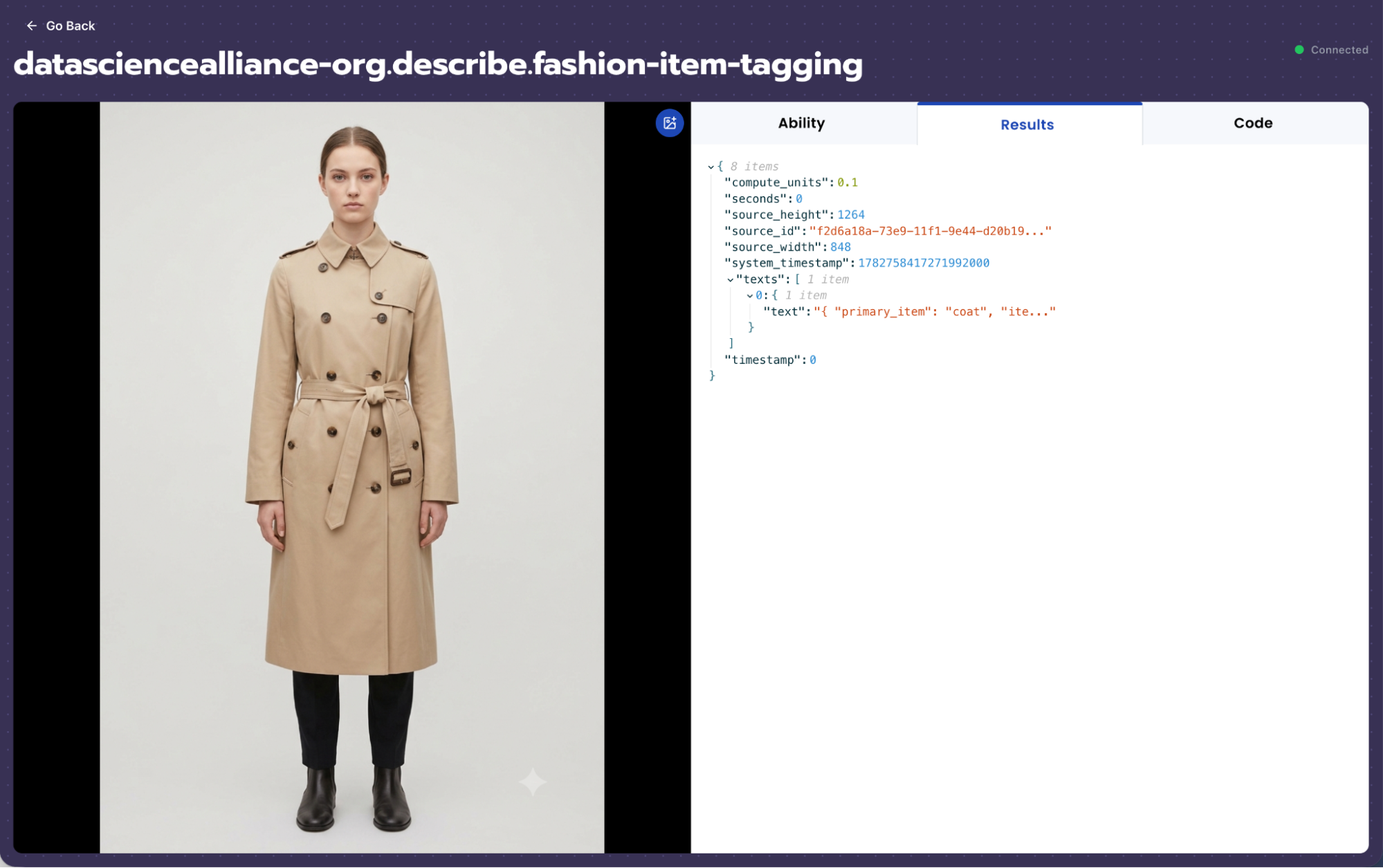
After creating the Describe ability, test it on several fashion product images from different categories. The expected output should be a structured JSON object that summarizes the primary item, item category, colors, pattern, material or texture, sleeve length, neckline, fit, style attributes, occasion, season, visible details, and e-commerce tags.
For example, if the image shows a black oversized hoodie with a hood, drawstrings, and a kangaroo pocket, the output should identify the primary item as hoodie, item category as top or outerwear, color as black, sleeve length as long sleeve, fit as oversized or relaxed, visible details as hood, drawstring, and kangaroo pocket, and e-commerce tags such as black hoodie, oversized hoodie, casual hoodie, streetwear, and athleisure.
If the image shows blue straight-leg jeans, the output should identify the primary item as jeans, item category as bottom, color as blue, material or texture as denim, fit as straight-leg or regular, visible details as belt loops, pockets, and zipper fly, and e-commerce tags such as blue jeans, denim jeans, straight-leg jeans, casual pants, and everyday wear.

Step 5: Review the Output
After testing the ability, review the JSON output to make sure the model is returning useful and consistent product tags.
Check whether:
- The primary clothing item is correct.
- The item category is broad and useful for filtering.
- The color tags match the visible product, not the background.
- The pattern is accurate.
- The material or texture is only included when visually clear.
- The sleeve length, neckline, and fit are not guessed when not visible.
- The e-commerce tags are concise and searchable.
- The output is valid JSON with no extra commentary.
If the output is too vague, add more specific instructions to the prompt. If the output guesses too much, strengthen the instruction to only tag visually observable attributes.
Tips for Accuracy
1. Explicit "Unknown" Case
Telling the model when not to guess is just as important as telling it what to identify. Fashion images often contain partial views, layered clothing, model poses, or textures that are difficult to determine from the image alone.
In our prompt, the explicit unknown case is handled through null, "unknown", and empty lists. If the model cannot clearly determine an attribute, it should mark the field as unknown rather than guessing.
2. Define "Edge Cases"
The key to high accuracy is clearly defining the difference between visually observable product attributes and assumptions. In an e-commerce context, the line between useful tags and guessed tags can be thin.
Examples of edge cases include:
- A color that looks different because of lighting or shadows.
- A background color being mistaken as part of the clothing item.
- A model wearing layered clothing where only one item should be tagged as the primary item.
- A satin-like fabric being confused with silk.
- A leather-like texture being confused with real leather.
- A cropped image where sleeve length or fit is not fully visible.
- A logo or graphic being visible but the brand name should not be guessed.
- Accessories appearing in the image but not being the main product.
3. Use Diverse Product Images
To improve performance, the dataset should include a wide range of fashion items and product photography styles. This includes flat-lay images, mannequin images, model-worn images, studio product images, and simple lifestyle product photos.
The dataset should also include many item categories, such as tops, bottoms, dresses, outerwear, shoes, and accessories. Including different colors, patterns, materials, and lighting conditions helps the model generate more consistent tags.
4. Separate Product Tags from Personal Attributes
The ability should describe the clothing item, not the person wearing it. The prompt should avoid asking for gender, body type, age, ethnicity, attractiveness, or identity-related attributes.
For e-commerce tagging, the most useful fields are product-focused attributes such as item type, color, pattern, material, fit, sleeve length, neckline, occasion, season, visible details, and searchable tags.
5. Keep the JSON Schema Consistent
For downstream e-commerce workflows, consistency is important. The model should always return the same JSON structure, even if some fields are unknown. This makes the output easier to parse, search, filter, and store in a product catalog.
6. Avoid Overly Specific Brand or Material Guesses
Unless a brand name or material is clearly visible, the model should not guess brand, designer, price, or exact fabric composition. Instead of saying "silk," it should say "satin-like" if the image only shows a shiny smooth texture. Instead of saying "leather," it should say "leather-like" if the actual material cannot be confirmed from the image alone.
Get early access
Want to move faster with visual automation? Request early access to Abilities and get notified as new vision capabilities roll out.