
End of Shift Cleaning
Analyze quick service restaurant dining room images and return a structured end-of-shift cleanliness and readiness report, including dining room cleanliness, wiped tables, mopped floors, trash removal, stocked condiment stations, chair positioning, lighting state, confidence, and visible issues.
datasciencealliance-org.describe.end-of-shift-cleaning:latest
Prompt
Analyze the quick service restaurant dining room image and return a structured end-of-shift cleaning readiness report. Return only valid JSON. Do not include markdown, explanations, or extra commentary.
...Run the full prompt in your EyePop.ai dashboard
Input
Image
Output
Structured JSON end-of-shift cleaning report with overall_cleanliness_score, dining_room_clean, tables_wiped, floors_appear_mopped, trash_removed, condiment_stations_stocked, chairs_positioned_correctly, lights_in_correct_state, cleaning_confidence, issues, and annotated_evidence
Image size
640x640
Model type
EyePop.ai VLM

How It Works
Describe with End of Shift Cleaning
Problem: Quick service restaurants need a reliable way to confirm that the dining room is ready for the next business day after closing. End-of-shift cleaning checks usually include making sure tables are wiped, floors are clean, trash is removed, condiment stations are stocked, chairs are positioned correctly, and the room lighting is appropriate for closing or inspection.
Manual end-of-shift review can be inconsistent because different employees may notice different issues. This ability uses a Describe Image task to analyze a restaurant dining room image and return a structured cleaning readiness report. The output includes cleanliness scores, visible cleaning issues, confidence level, and annotated visual evidence.
The expected input is a quick service restaurant or retail dining room image taken after closing or during end-of-shift inspection. The expected output is a structured JSON object that summarizes whether the restaurant appears ready for tomorrow.
This ability is useful for identifying incomplete closing tasks, such as dirty tables, unmopped floors, trash left behind, messy or unstocked condiment stations, chairs left out of place, or lighting issues. For example, a clean dining room with wiped tables, clear floors, empty trash bins, stocked condiment stations, and aligned chairs should receive a high cleanliness score. A dining room with leftover trays, crumbs, visible floor debris, messy condiment stations, or misaligned chairs should return lower scores and list the visible issues.
Step 1: Create a Describe Image Ability
Go to the Abilities tab and select Create Ability.
Fill out the basic information for the ability.
Name: end-of-shift-cleaning
Description: Analyze quick service restaurant dining room images and return a structured end-of-shift cleanliness and readiness report, including dining room cleanliness, wiped tables, mopped floors, trash removal, stocked condiment stations, chair positioning, lighting state, confidence, and visible issues.
Task: Describe Image
Then click Continue.
Step 2: Task Configuration
Select or create a dataset containing end-of-shift dining room images.
The dataset should include clear examples of different closing conditions, such as fully cleaned dining rooms, dirty tables, unwiped tables, food or debris on the floor, full trash bins, messy condiment stations, unstocked condiment stations, chairs not pushed in, poor lighting, and rooms that are fully ready for the next day.
Because this is a Describe Image ability, you do not need classification labels. The ability will return a structured JSON output instead of a single class label.
Step 3: Configuration
Max New Tokens: 400
Scaled to: Medium - 640x640
FPS: --NA--
Input: Image
Output: Structured JSON end-of-shift cleaning report
Use Max New Tokens = 400 because the model needs enough room to return the full JSON object with scores, issues, and annotated evidence.
Use Medium - 640x640 because the model needs enough visual detail to inspect tables, floors, trash bins, condiment stations, chairs, and lighting.
FPS is not applicable because this is an image description ability, not a video event detection ability.
Step 4: Prompt
Paste the prompt into the prompt box.
Step 5: Create Ability
Click Create Ability.
The final alias should look like this: datasciencealliance-org.describe.end-of-shift-cleaning:latest
Step 6: Test the Ability
Test the ability with one clear end-of-shift dining room image first.
A good output for a mostly clean dining room with a few issues might look like this:
{
"overall_cleanliness_score": 3,
"dining_room_clean": 4,
"tables_wiped": 3,
"floors_appear_mopped": 3,
"trash_removed": 4,
"condiment_stations_stocked": 3,
"chairs_positioned_correctly": 3,
"lights_in_correct_state": "correct",
"cleaning_confidence": "high",
"issues": ["dirty_tables", "food_on_floor", "condiment_station_messy", "chairs_misaligned"],
"annotated_evidence": [
{
"issue": "dirty_tables",
"location": "center dining area",
"evidence": "Two tables have visible cups, napkins, trays, crumbs, or wrappers left on top.",
"severity": "moderate"
},
{
"issue": "food_on_floor",
"location": "main walkway",
"evidence": "Small debris or crumbs are visible on the floor.",
"severity": "minor"
}
]
}
A good output for a clean dining room might look like this:
{
"overall_cleanliness_score": 5,
"dining_room_clean": 5,
"tables_wiped": 5,
"floors_appear_mopped": 5,
"trash_removed": 5,
"condiment_stations_stocked": 5,
"chairs_positioned_correctly": 5,
"lights_in_correct_state": "correct",
"cleaning_confidence": "high",
"issues": ["none"],
"annotated_evidence": []
}
Real evaluation images return similar structured results. A dining room with several visible issues might score like this:
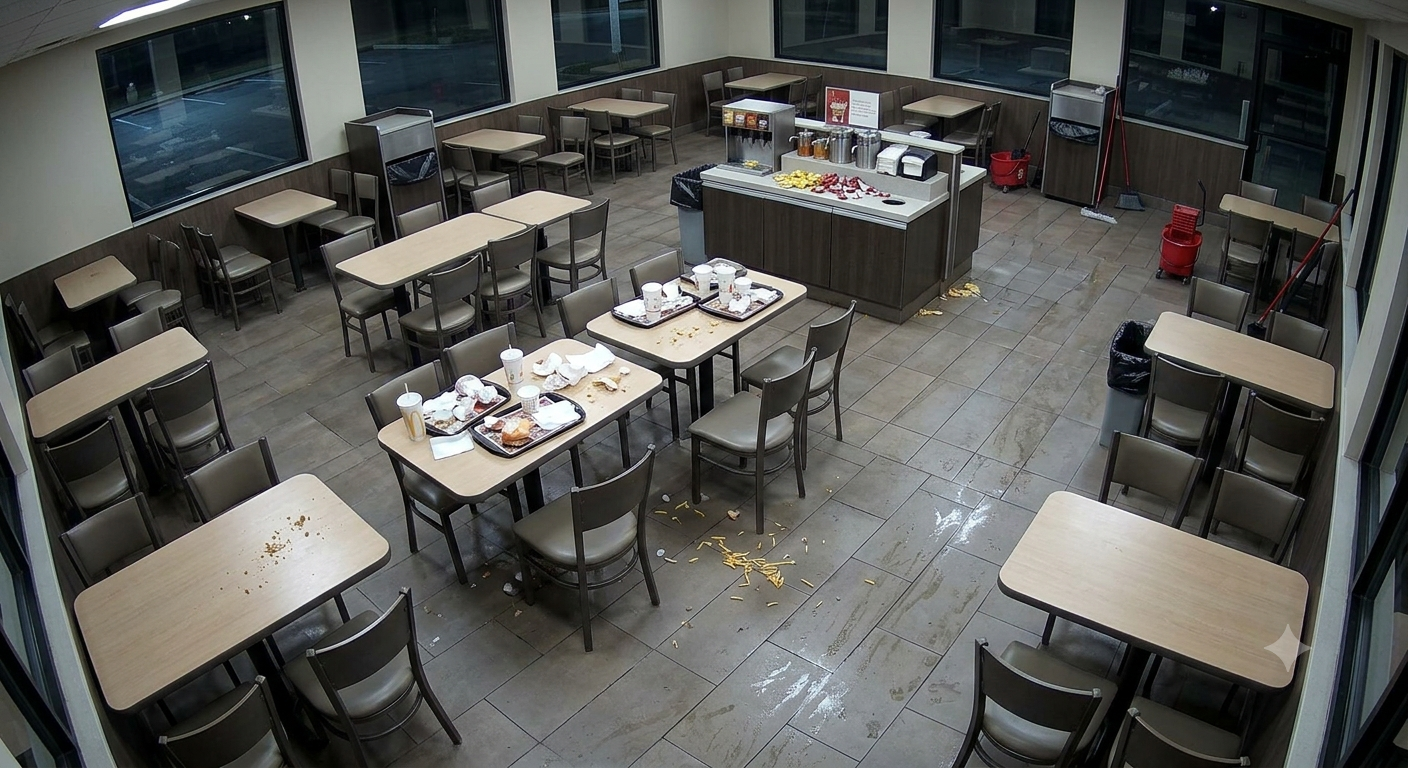
{
"overall_cleanliness_score": 2,
"dining_room_clean": 2,
"tables_wiped": 2,
"floors_appear_mopped": 1,
"trash_removed": 3,
"condiment_stations_stocked": 5,
"chairs_positioned_correctly": 5,
"lights_in_correct_state": "correct",
"cleaning_confidence": "high",
"issues": ["dirty_tables", "unwiped_tables", "food_on_floor", "floor_not_mopped"],
"annotated_evidence": [
{
"issue": "dirty_tables",
"location": "center dining area",
"evidence": "Multiple tables have food trays, cups, and wrappers left on them.",
"severity": "moderate"
},
{
"issue": "unwiped_tables",
"location": "front left tables",
"evidence": "Tables have visible crumbs and food residue scattered on the surface.",
"severity": "moderate"
},
{
"issue": "food_on_floor",
"location": "main walkway",
"evidence": "Yellow food debris, likely from a tray, is scattered across the floor in the center aisle.",
"severity": "moderate"
},
{
"issue": "floor_not_mopped",
"location": "main walkway",
"evidence": "The floor is visibly wet and has scattered food debris, indicating it has not been cleaned or mopped.",
"severity": "moderate"
}
]
}
A dining room with more significant issues might score even lower:
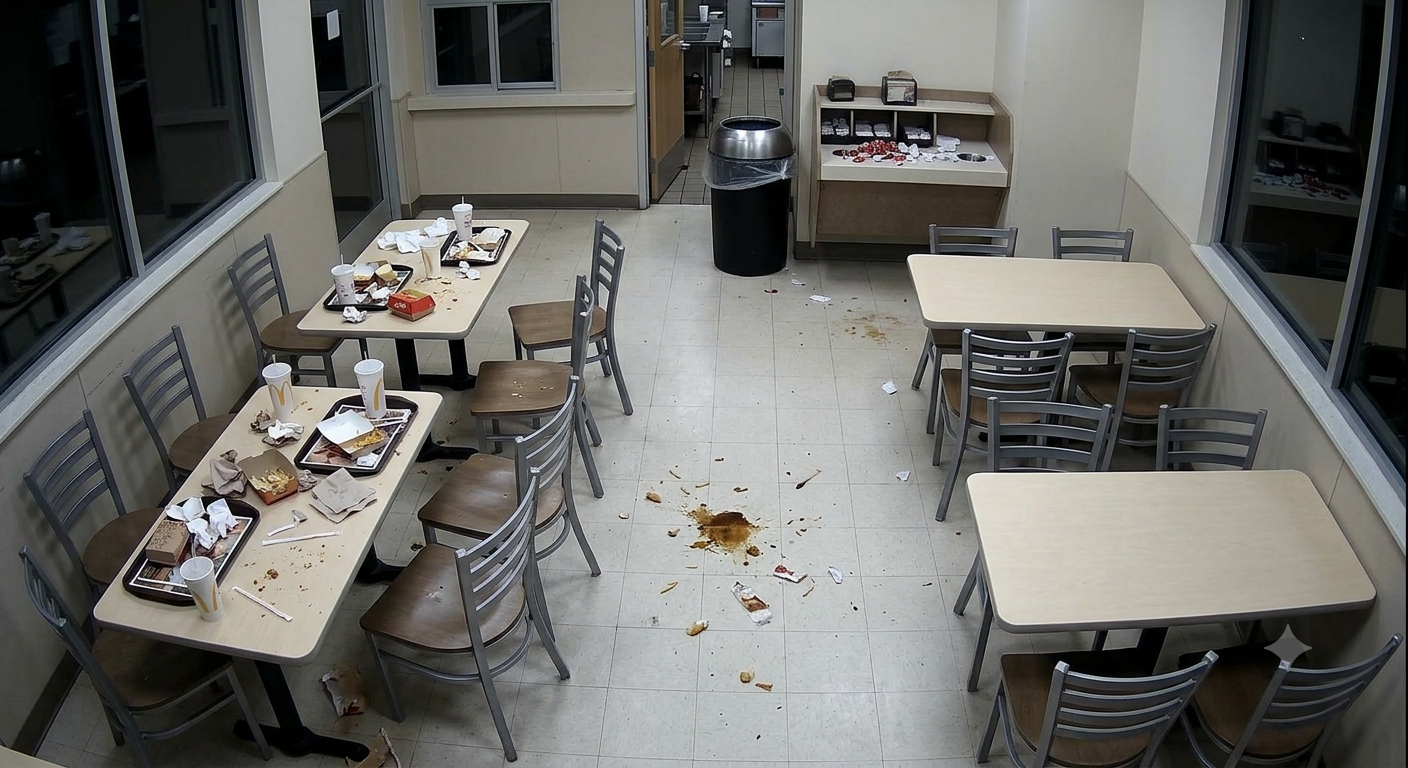
{
"overall_cleanliness_score": 1,
"dining_room_clean": 1,
"tables_wiped": 1,
"floors_appear_mopped": 1,
"trash_removed": 1,
"condiment_stations_stocked": 3,
"chairs_positioned_correctly": 1,
"lights_in_correct_state": "correct",
"cleaning_confidence": "high",
"issues": ["dirty_tables", "unwiped_tables", "food_on_floor", "trash_visible", "condiment_station_messy", "condiment_station_unstocked", "chairs_misaligned", "floor_not_mopped"],
"annotated_evidence": [
{
"issue": "dirty_tables",
"location": "front left tables",
"evidence": "Tables are covered with used food trays, cups, wrappers, and trash.",
"severity": "severe"
},
{
"issue": "food_on_floor",
"location": "center dining area",
"evidence": "A large spill of food and liquid is visible on the floor in the middle of the room.",
"severity": "severe"
},
{
"issue": "trash_visible",
"location": "center dining area",
"evidence": "Scattered trash, wrappers, and debris are visible on the floor throughout the main walkway.",
"severity": "moderate"
},
{
"issue": "condiment_station_messy",
"location": "back right condiment station",
"evidence": "The condiment station has scattered items and appears disorganized.",
"severity": "moderate"
}
]
}
Tips for Accuracy
1. Make each cleaning area clearly visible
Use images that clearly show tables, floors, chairs, trash bins, and condiment stations. If an area is not visible, the model may correctly return null or unknown instead of guessing.
2. Use simple images with obvious issues
This ability works best when the image has clear visible conditions, such as two dirty tables, a small floor mess, a full trash bin, or a messy condiment station. Avoid overly crowded or cluttered images where too many issues overlap.
3. Separate clean and not-ready examples
Use clean examples where the dining room is clearly ready for tomorrow, and not-ready examples where the remaining issues are obvious. This helps the model distinguish high cleanliness scores from partial cleaning scores.
Get early access
Want to move faster with visual automation? Request early access to Abilities and get notified as new vision capabilities roll out.