
Create Visual Transcript of Video
Create a visual transcript of a video to produce a text description of the scene.
eyepop.describe.visual-transcript:latest
Prompt
You are given a short video segment (approximately 1–5 seconds).
Your task is to produce a factual description of what is visually observable.
Write EXACTLY 100 words.
----------------------------------------
INSTRUCTIONS:
1. Describe only what is visually observable.
2. Do NOT infer intent, emotions, motivations, or off-screen events...
...Run the full prompt in your EyePop.ai dashboard
Input
Video
Output
Text or NO
Image size
512x512
Model type
EyePop.ai VLM
FPS
10

How It Works
The Describe Video task on the Abilities tab is able to create a visual transcript of short videos. This tool is incredibly useful because it can be used as a building block alongside other abilities to better understand how the VLM processes a video or on its own to simply describe a scene in a couple of words. With this ability, if you upload a video of a construction site, the model shouldn't just say “a construction site with people”.
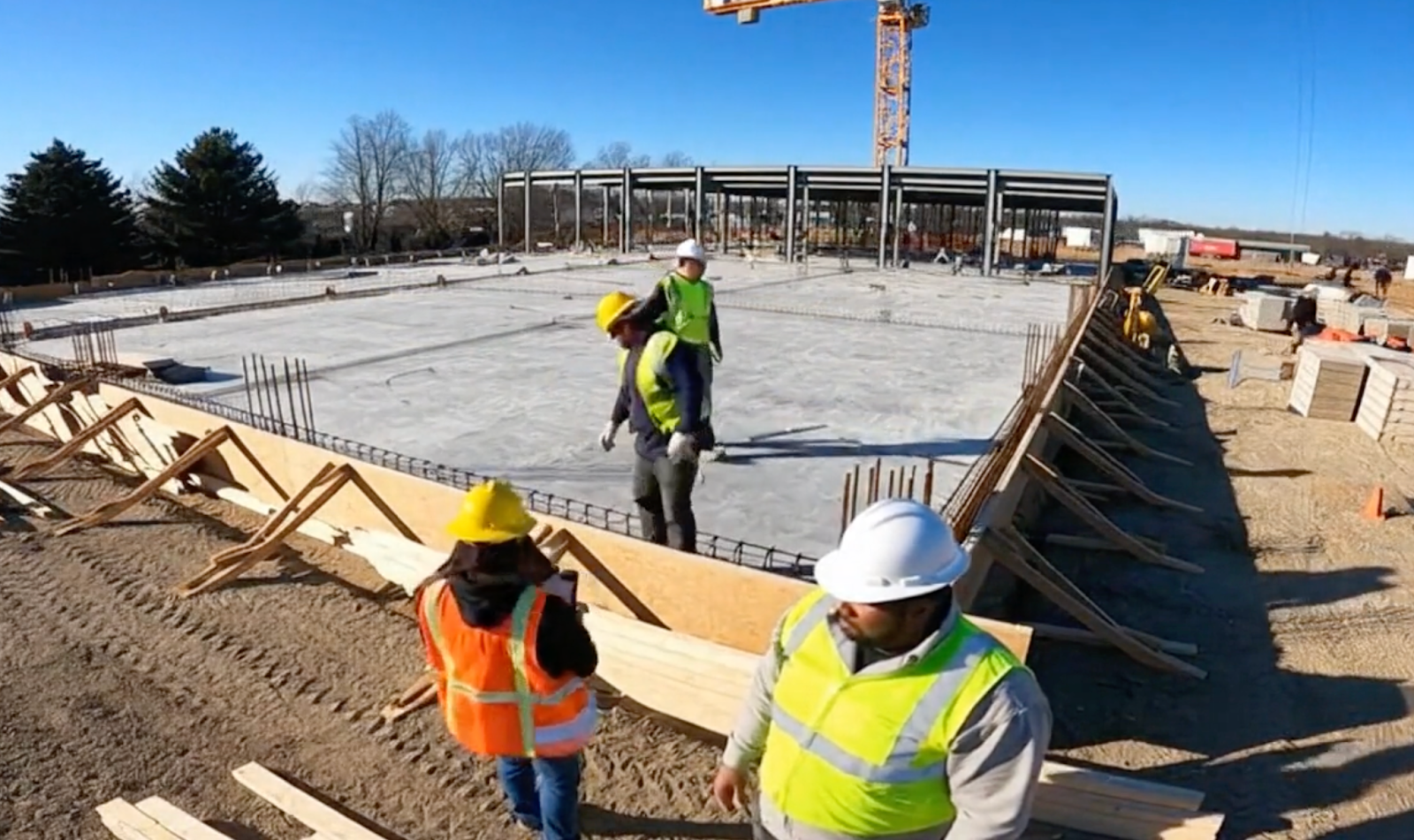
Based on a strong prompt, it should output a thorough description: "Construction workers in safety vests and hard hats are on a site under clear blue skies. Two workers in the foreground gesture and move slightly. Two others work on a concrete slab, bending over rebar. A large crane stands in the background near a partially built steel frame. Wooden planks and construction materials lie on the ground. Shadows stretch across the dirt and concrete. Trees line the horizon. The scene is brightly lit by direct sunlight. No visible text or numbers."
SDK Tutorial
Step 1: Create an Ability
First, let’s define the ability:
from eyepop import EyePopSdk
from eyepop.data.data_types import InferRuntimeConfig, VlmAbilityGroupCreate, VlmAbilityCreate, TransformInto
from eyepop.worker.worker_types import CropForward, ForwardComponent, FullForward, InferenceComponent, Pop
import json


ability_prototypes = [
   VlmAbilityCreate(
       name=f"{NAMESPACE_PREFIX}.describe.visual-transcript",
       description="Describe the given video",
       worker_release="qwen3-instruct",
       text_prompt=transcript-prompt,
       transform_into=TransformInto(),
       config=InferRuntimeConfig(
           max_new_tokens=150,
           fps=10,
           image_size=512
       ),
       is_public=False
   )
]
The prompt we can use here is:
You are given a short video segment (approximately 1–5 seconds).

     Your task is to produce a factual description of what is visually observable.

         Write EXACTLY 100 words.

         ----------------------------------------
         INSTRUCTIONS:

         1. Describe only what is visually observable.
         2. Do NOT infer intent, emotions, motivations, or off-screen events.
         3. Do NOT speculate.
         4. Do NOT add background context not visible in the frames.
         5. Do NOT mention camera quality, resolution, or metadata.
         6. Use clear, neutral, objective language.
         7. Use present tense.
         8. Avoid repetition.
         9. No bullet points.
         10. No introduction or conclusion.

         ----------------------------------------
         CONTENT GUIDELINES:

         Include when visible:
         - Subjects (people, animals, objects)
         - Actions occurring
         - Spatial relationships
         - Environment or setting
         - Notable motion
         - Visible text or numbers
         - Lighting conditions
         - Weather conditions (if visible)

         ----------------------------------------
         STRICT OUTPUT RULES:

         - Output exactly 100 words.
         - Do not include a word count.
         - Do not include commentary.
         - Do not include quotation marks unless text appears visibly in the scene.
         - If the content is unclear or visually ambiguous, describe what is clearly visible.
         - If the segment is blank or unreadable, output: NO

         ----------------------------------------

         Return only the 100-word description.
Next, we can actually create the ability with the following code:
with EyePopSdk.dataEndpoint(api_key=EYEPOP_API_KEY, account_id=EYEPOP_ACCOUNT_ID) as endpoint:
   for ability_prototype in ability_prototypes:
       ability_group = endpoint.create_vlm_ability_group(VlmAbilityGroupCreate(
           name=ability_prototype.name,
           description=ability_prototype.description,
           default_alias_name=ability_prototype.name,
       ))
       ability = endpoint.create_vlm_ability(
           create=ability_prototype,
           vlm_ability_group_uuid=ability_group.uuid,
       )
       ability = endpoint.publish_vlm_ability(
           vlm_ability_uuid=ability.uuid,
           alias_name=ability_prototype.name,
       )
       ability = endpoint.add_vlm_ability_alias(
           vlm_ability_uuid=ability.uuid,
           alias_name=ability_prototype.name,
           tag_name="latest"
       )
       print(f"created ability {ability.uuid} with alias entries {ability.alias_entries}")
That’s it! To run the prompt against a video, here is some sample evaluation code:
from pathlib import Path


pop = Pop(components=[
  InferenceComponent(
      ability=f"{NAMESPACE_PREFIX}.describe.visual-transcript:latest",
      videoChunkLengthSeconds=video_length # replace with the video length in seconds minus 1
  )
])


with EyePopSdk.workerEndpoint(api_key=EYEPOP_API_KEY) as endpoint:
  endpoint.set_pop(pop)
  sample_video_path = Path("/content/sample_video.mp4")
  job = endpoint.upload(sample_video_path)
  while result := job.predict():
     print(json.dumps(result, indent=2))


print("Done")
Get early access
Want to move faster with visual automation? Request early access to Abilities and get notified as new vision capabilities roll out.